
Consent records
Consent records you can export when someone asks
Every cookie and form choice is saved with a timestamp: who agreed, what to and when. Export your consent records when a customer, partner or the OAIC asks for proof of consent.

Why businesses trust Savira
- Australian owned
- Account data and consent records hosted in Australia
- Built for the Australian Privacy Principles
Inside a record
What a consent record contains
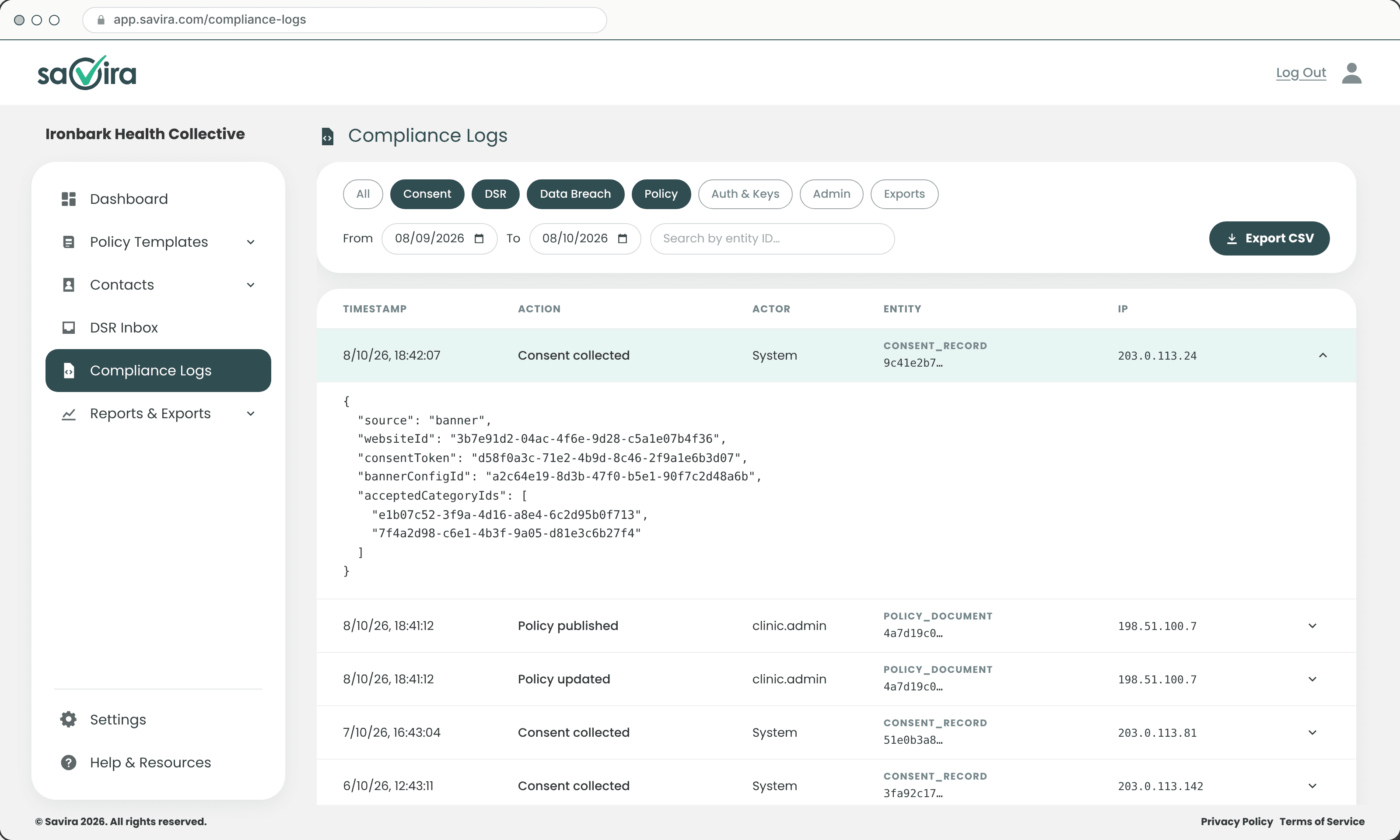
Every consent record shows when a choice was made, which browser made it, which banner it came through and which categories were accepted. Those facts are what you need when a customer, a partner or the OAIC asks you to show that someone said yes before you collected their information.
| Part | What it records | Why it matters |
|---|---|---|
| Who | A consent token for the browser that made the choice, and the IP address | Links the choice to one browser when someone asks about it |
| What | The categories the visitor accepted, such as analytics or marketing | Shows tracking ran only for categories they agreed to |
| When | The date and time of the choice | Shows consent came before collection, not after |
| Which banner | The banner configuration the visitor was shown | Shows which banner setup was live when they chose |
| Where | Where the choice was made, such as the banner, and which of your websites | Shows how and on which site consent was collected |
Records are written automatically when a visitor makes a choice and appear in the Compliance logs in your account, alongside other compliance events.
A sample consent record
Fields in a consent record, from a demonstration account
| Field | Example | What it tells you |
|---|---|---|
| Action | Consent collected | The type of event |
| Actor | System | Recorded automatically, not entered by hand |
| Timestamp | 31/10/26, 19:20:17 | When the visitor made the choice |
| Source | banner | Where the choice was made |
| Website ID | dc753770... | Which of your websites it came from |
| Consent token | 38cab2ab... | The browser's choice, as one unique token |
| Banner configuration ID | 01475144... | Which banner setup the visitor saw |
| Accepted categories | 4 categories | The categories the visitor agreed to |
| IP address | 203.0.113.0 | The visitor's network address |
Example values from a demonstration account, shortened for display. Field names in your account may differ.
What gets recorded
A timestamp on every step
Banner choices
Accept, reject or custom, per visitor.
Marketing opt ins
Forms, sign-ups and reconfirmation replies.
Policy changes
When your published policy changed.
Notices sent
Breach and request responses you send from Savira.
Retention
How long to keep consent records
Keep a consent record for as long as you rely on that consent, plus enough time to answer a question or complaint about it. The Privacy Act does not set a fixed number of years.
Australian Privacy Principle 11.2 asks you to destroy or de-identify personal information once you no longer need it for any purpose you are allowed to use it for. A consent record is personal information, so the same rule applies to it.
In practice, most businesses keep a record while the person is still a customer or subscriber, and for a set period after they withdraw consent or the relationship ends. Pick a period, write it in your privacy policy and apply it the same way every time. Other laws, such as tax or health records laws, can set longer periods for related records.
Our data retention guide covers how to choose a period and what to delete.
Export
Exporting records for a customer or the OAIC
When someone asks what they agreed to, or a regulator asks how you collect consent, you export the records and send them. No digging through server logs.
When a customer asks
Under APP 12, people can ask for the personal information you hold about them, and you respond within a reasonable period. The OAIC generally considers 30 days reasonable. Find the matching records, export them and include the export in your reply.
When the OAIC asks
If the OAIC investigates a complaint or reviews your practices, it may ask how you collect consent and what people were told. An export of your records for a date range answers the first question in one file.
How to export
- Open Compliance logs in your Savira account.
- Choose Consent to show consent records only. The other filters cover other compliance events.
- Set the From and To dates, or search by entity ID to find one record.
- Select Export CSV.
What the export includes
- Every field in the record: timestamp, source, website, consent token, banner configuration, accepted categories and IP address
- Filters by log type, date range and entity ID
- A CSV file your team can open in Excel or Google Sheets
How do I record consent under the Privacy Act?
Record each choice at the moment it is made, with the time, the categories accepted and the banner shown. Savira does this automatically for choices made on your cookie banner.
What counts as proof of consent?
Proof of consent is a timestamped record showing which browser made a choice, which categories it accepted and which banner it was shown. A screenshot of your banner on its own does not show that a choice was made.
How long should I keep consent records?
Keep them for as long as you rely on that consent, plus a set period to answer questions or complaints, then delete them. The Privacy Act does not set a fixed period. See our guide on how long to keep records.
Is there a consent audit log?
Yes. Every banner choice is logged in Compliance Logs, alongside banner and policy changes, data requests and breach events. Filter by type or date and export as CSV. See consent records and Compliance Logs.
Can I export everything if I leave?
Yes. Go to Reports & Exports > Exports and download the full consent ledger as CSV or Excel at any time.
Where are consent records stored?
On AWS in Sydney, with identifiable end-user data encrypted at rest.
Can I look up one person's consent history?
Yes. Go to Reports & Exports > Consent Lookup and enter their email address or contact token to see every choice they have made.